# Logs API

### Logs API <a href="#od_98956bb5" id="od_98956bb5"></a>

<figure><img src="/files/VyBXGqVWY3d3ndSHyQK1" alt=""><figcaption></figcaption></figure>

<table><thead><tr><th width="58.333333333333314">#</th><th>Menu item</th><th>Description</th></tr></thead><tbody><tr><td>1</td><td>LAST RESIZES</td><td>Gives a specific summary of the latest resizing processes</td></tr><tr><td>2</td><td>SLOW DOWNLOADS</td><td>Gives a specific summary of slow downloads processes</td></tr><tr><td>3</td><td>FAILED DOWNLOADS</td><td>Gives a specific summary of failed downloads (Timeout)</td></tr><tr><td>4</td><td>UNIQUE URLS</td><td>Unique URLs per token</td></tr><tr><td>5</td><td>CDN</td><td>Gives summary for each log in the CDN</td></tr></tbody></table>

**Note: All the tabs are updated every minute from latest logs**

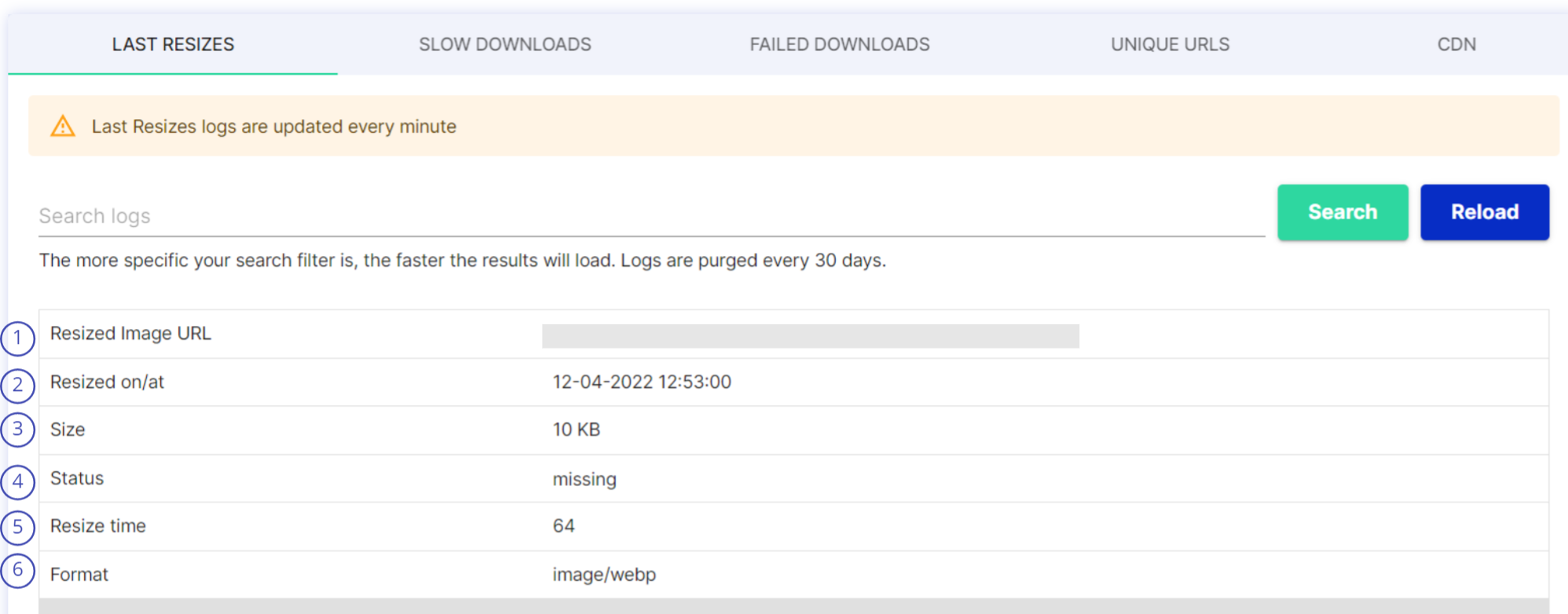
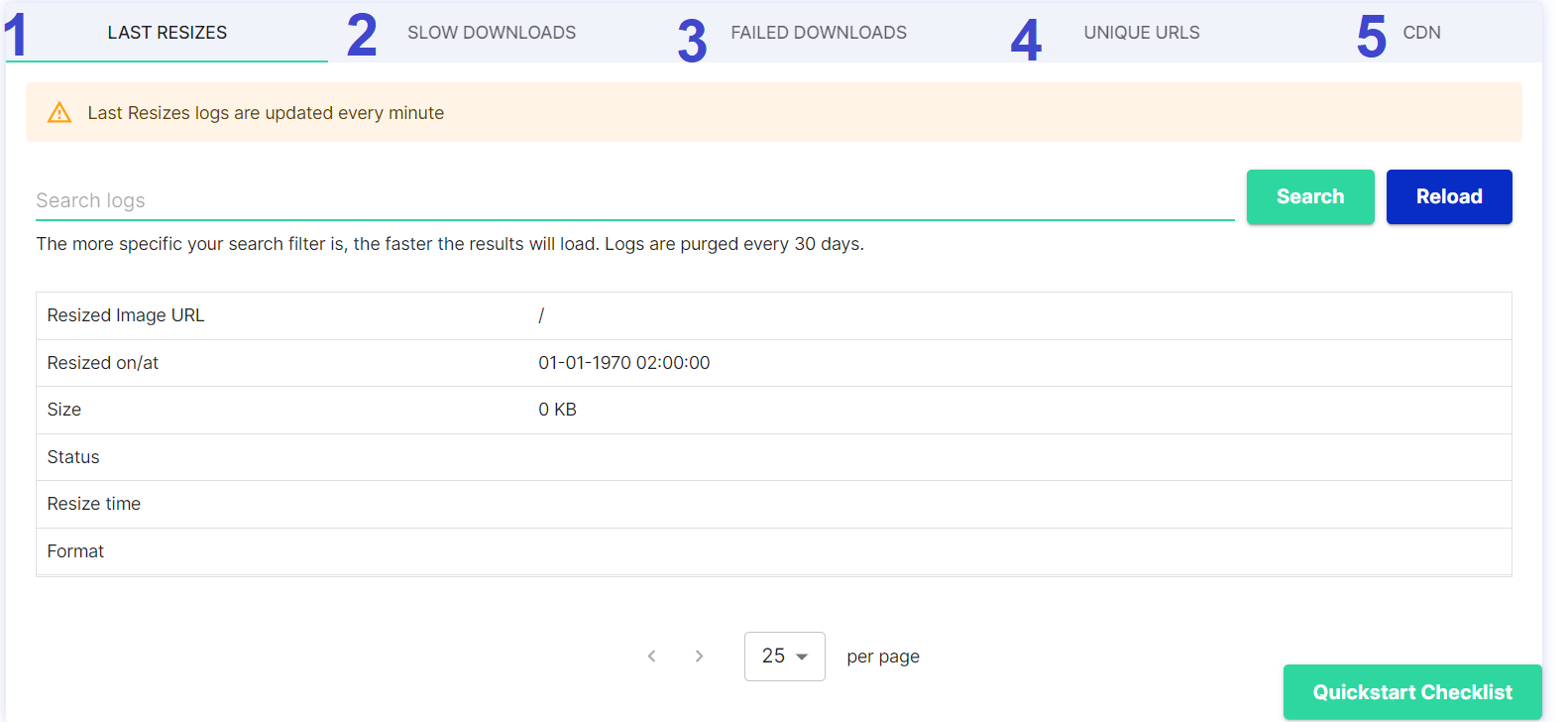
**1. LAST RESIZES**

<figure><img src="/files/1Fcbw1FNzUCgTFVKJFgV" alt=""><figcaption></figcaption></figure>

<table><thead><tr><th width="58.333333333333314">#</th><th>Item</th><th>Description</th></tr></thead><tbody><tr><td>1</td><td>Resized Image URL</td><td>Path of the image</td></tr><tr><td>2</td><td>Resized on/at</td><td>Timestamp of the resize process</td></tr><tr><td>3</td><td>Size</td><td>Size of image</td></tr><tr><td>4</td><td>Status</td><td>Status of an image in server</td></tr><tr><td>5</td><td>Resize time</td><td>Time taken to resize (Milliseconds)</td></tr><tr><td>6</td><td>Format</td><td>Image format</td></tr></tbody></table>

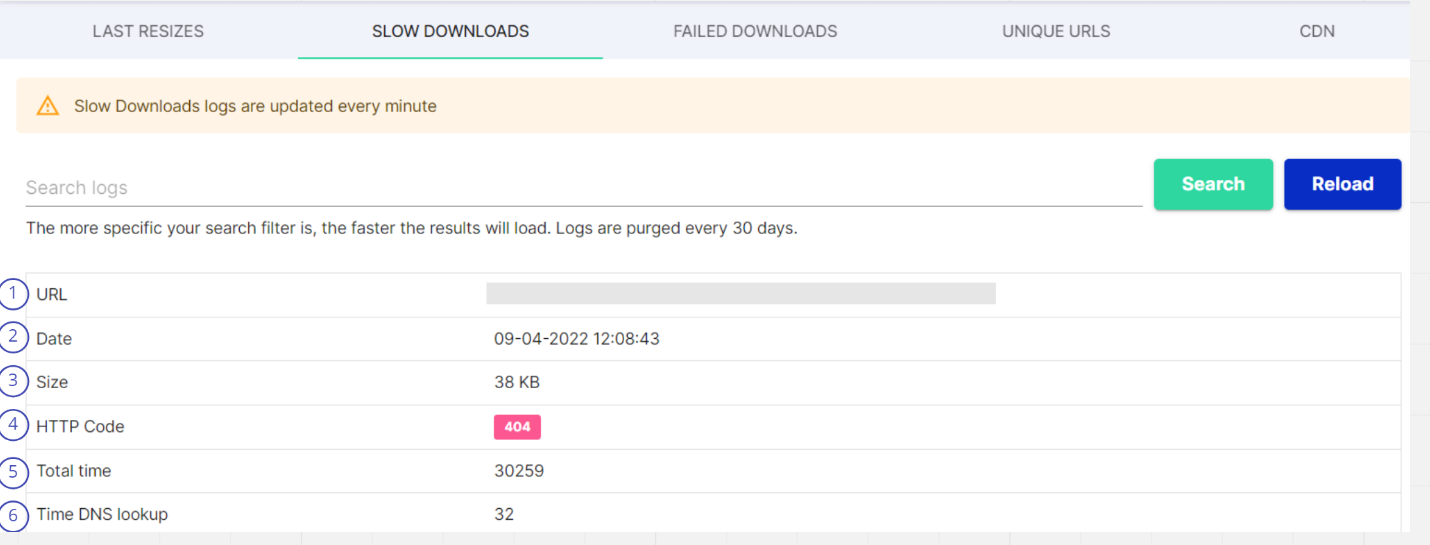
**2. SLOW DOWNLOADS**

<figure><img src="/files/EO0bZKWEUBV2wiOv8glo" alt=""><figcaption></figcaption></figure>

<table><thead><tr><th width="58.333333333333314">#</th><th>Item</th><th>Description</th></tr></thead><tbody><tr><td>1</td><td>URL</td><td>Path of the image</td></tr><tr><td>2</td><td>Date</td><td>Timestamp for the download process</td></tr><tr><td>3</td><td>Size</td><td>Size of Image</td></tr><tr><td>4</td><td>HTTP code</td><td>This is the HTTP code sent by Server, which will be forwarded to the user. It should mostly be 200 for successful images, 4xx and 5xx when we have a problem</td></tr><tr><td>5</td><td>Total Time</td><td>Total time to process the request for an image</td></tr><tr><td>6</td><td>Time DNS lookup</td><td>the time it takes a Domain Name Server to receive the request for a domain name’s IP address, process it, and return the IP address to the browser</td></tr></tbody></table>

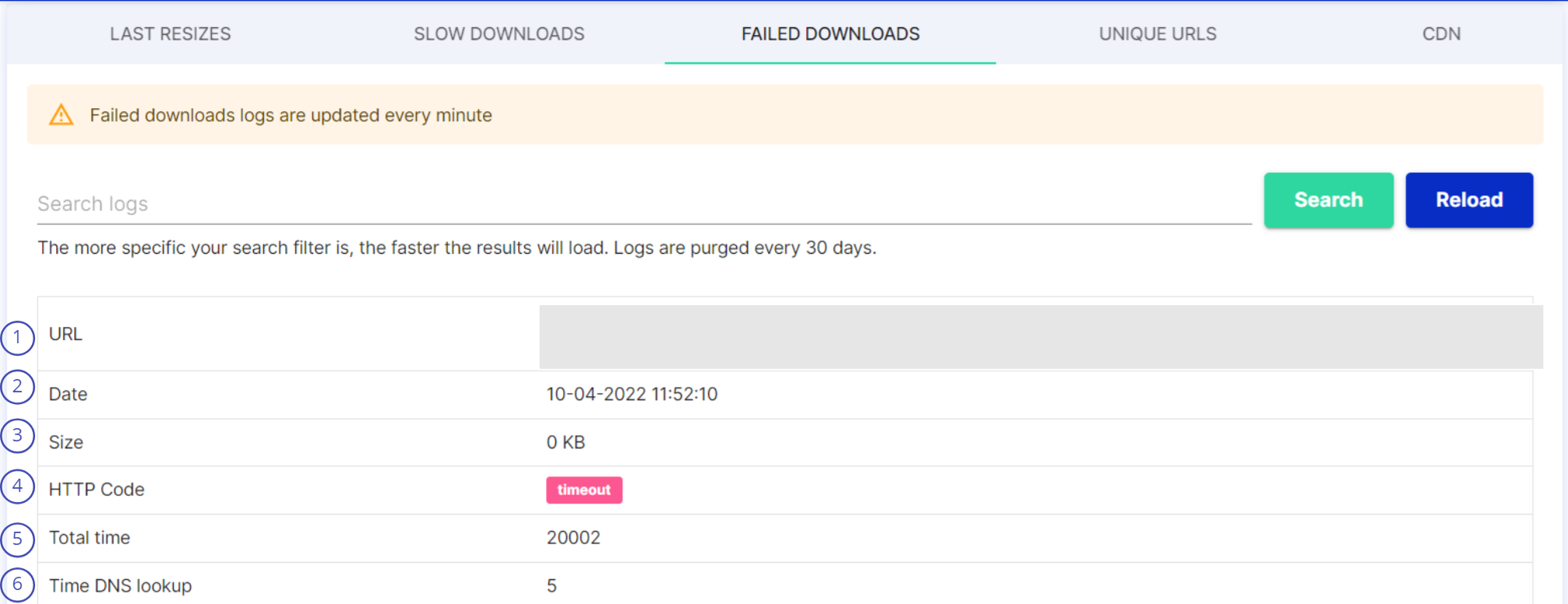
**3. FAILED DOWNLOADS**

<figure><img src="/files/ILTTDp1yI7exp5ZH6Ca9" alt=""><figcaption></figcaption></figure>

<table><thead><tr><th width="58.333333333333314">#</th><th>Item</th><th>Description</th></tr></thead><tbody><tr><td>1</td><td>URL</td><td>Path of the image</td></tr><tr><td>2</td><td>Date</td><td>Timestamp for the download process</td></tr><tr><td>3</td><td>Size</td><td>Size of Image</td></tr><tr><td>4</td><td>HTTP Code</td><td>This is the HTTP code sent by Server, which will be forwarded to the user. It should mostly be 200 for successful images, 4xx and 5xx when we have a problem</td></tr><tr><td>5</td><td>Total Time</td><td>Total time to process the request for an image</td></tr><tr><td>6</td><td>Time DNS lookup</td><td>the time it takes a Domain Name Server to receive the request for a domain name’s IP address, process it, and return the IP address to the browser</td></tr></tbody></table>

**4. UNIQUE URLS**

<table><thead><tr><th width="58.333333333333314">#</th><th>Item</th><th>Description</th></tr></thead><tbody><tr><td>1</td><td>Type of Path</td><td>Will usually be URL, unless a specific configuration, like presets, is used</td></tr><tr><td>2</td><td>Path</td><td>Actual path (value) of location and resource accessed</td></tr></tbody></table>

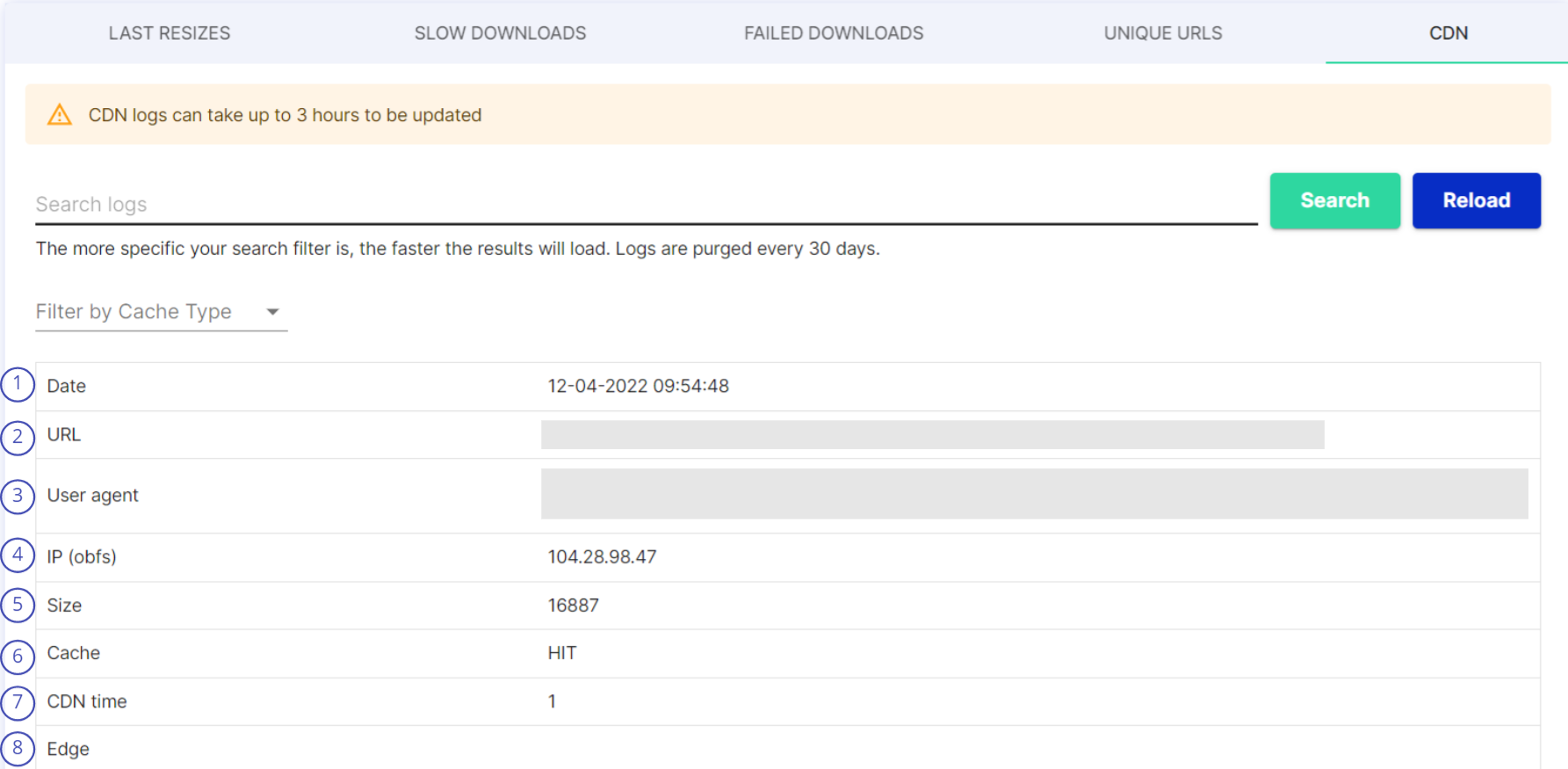
**5. CDN**

<figure><img src="/files/nkQndaPpG0WZhcwcY5Fs" alt=""><figcaption></figcaption></figure>

<table><thead><tr><th width="58">#</th><th>Item</th><th>Description</th></tr></thead><tbody><tr><td>1</td><td>Date</td><td>Timestamp for the process</td></tr><tr><td>2</td><td>URL</td><td>Not the full URL, only PATH of the file</td></tr><tr><td>3</td><td>User agent</td><td>User Agent (including OS/browser name) of the user which initially requested the image. This is information from the user, before the CDN</td></tr><tr><td>4</td><td>IP (obfs)</td><td>IP address of client</td></tr><tr><td>5</td><td>Size</td><td>Size of file</td></tr><tr><td>6</td><td>Cache</td><td>Cache type , It shows if the file exists in the CDN cache or not</td></tr><tr><td>7</td><td>CDN time</td><td>CDN response time</td></tr><tr><td>8</td><td>Edge</td><td>(empty, deprecated)</td></tr></tbody></table>


---

# Agent Instructions: Querying This Documentation

If you need additional information that is not directly available in this page, you can query the documentation dynamically by asking a question.

Perform an HTTP GET request on the current page URL with the `ask` query parameter:

```
GET https://docs.cloudimage.io/account-management/dashboards/logs-api.md?ask=<question>
```

The question should be specific, self-contained, and written in natural language.
The response will contain a direct answer to the question and relevant excerpts and sources from the documentation.

Use this mechanism when the answer is not explicitly present in the current page, you need clarification or additional context, or you want to retrieve related documentation sections.