# Volumetry

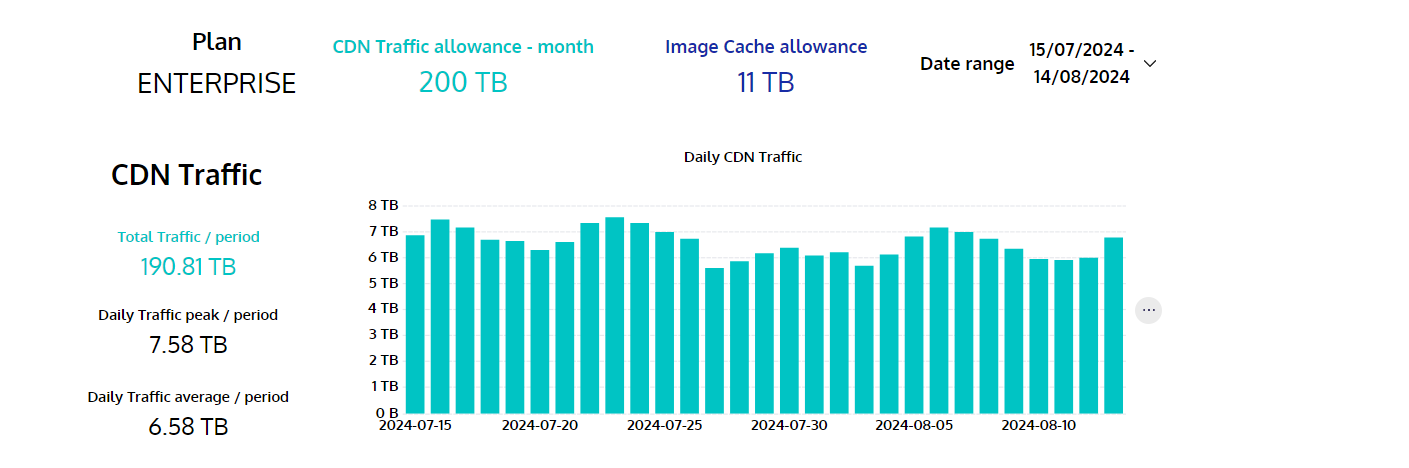
Volumetry page displays the overview for CDN traffic, image cache, edge requests and variant rate of a token during a selected period (default: past 30 days).\ <br>

<figure><img src="/files/d7cMaDg69rJN6RwswPQJ" alt=""><figcaption></figcaption></figure>

<table><thead><tr><th width="58">#</th><th>Title</th><th>Description</th></tr></thead><tbody><tr><td>1</td><td>Plan</td><td>Subscribed Plan</td></tr><tr><td>2</td><td>CDN Traffic allowance - month</td><td>Monthly allowed usage of CDN</td></tr><tr><td>3</td><td>Image Cache allowance - month</td><td>Monthly allowed usage of Image cache</td></tr><tr><td>4</td><td>Daily CDN traffic</td><td>Total CDN traffic per day</td></tr><tr><td>5</td><td>Total traffic / period</td><td>Sum of CDN traffic during selected period</td></tr><tr><td>6</td><td>Daily traffic peak / period</td><td>Max traffic during selected period</td></tr><tr><td>7</td><td>Daily traffic average / period</td><td>Average of CDN traffic during selected period</td></tr></tbody></table>

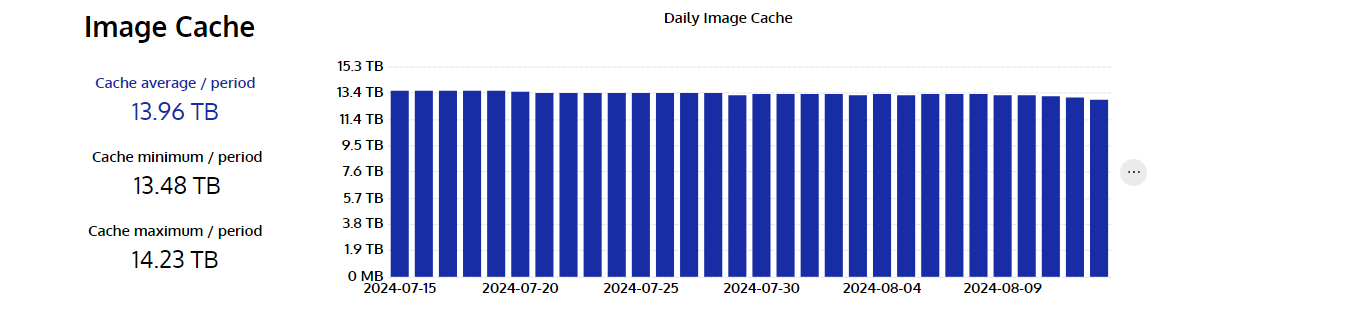
<figure><img src="/files/02pKM3gPZNoH4JFEdztm" alt=""><figcaption></figcaption></figure>

<table><thead><tr><th width="58">#</th><th>Title</th><th>Description</th></tr></thead><tbody><tr><td>1</td><td>Cache average / period</td><td>Average cached images within a selected period</td></tr><tr><td>2</td><td>Cache minimum / period</td><td>Minimum cached images within a selected period</td></tr><tr><td>3</td><td>Cache maximum / period</td><td>Maximum cached images within a selected period</td></tr><tr><td>4</td><td>Daily Image Cache</td><td>Daily total traffic of cached images</td></tr></tbody></table>

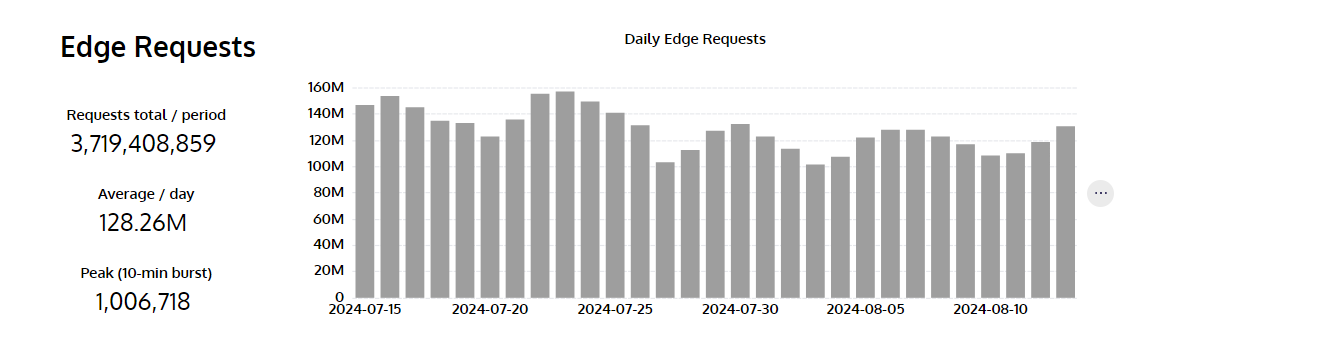
<figure><img src="/files/P0VuHSE8Rfmz3vIEPe50" alt=""><figcaption></figcaption></figure>

<table><thead><tr><th width="58">#</th><th>Title</th><th>Description</th></tr></thead><tbody><tr><td>1</td><td>Requests total / period</td><td>Total CDN requests that hit the CDN cache for the selected period.</td></tr><tr><td>2</td><td>Average / day</td><td>Average CDN requests per day during the selected period.</td></tr><tr><td>3</td><td>Peak(10-min burst)</td><td>Represents the maximum number of hit requests within 10 minutes during the selected period.</td></tr><tr><td>4</td><td>Daily Edge Requests</td><td>Daily total hit requests</td></tr></tbody></table>

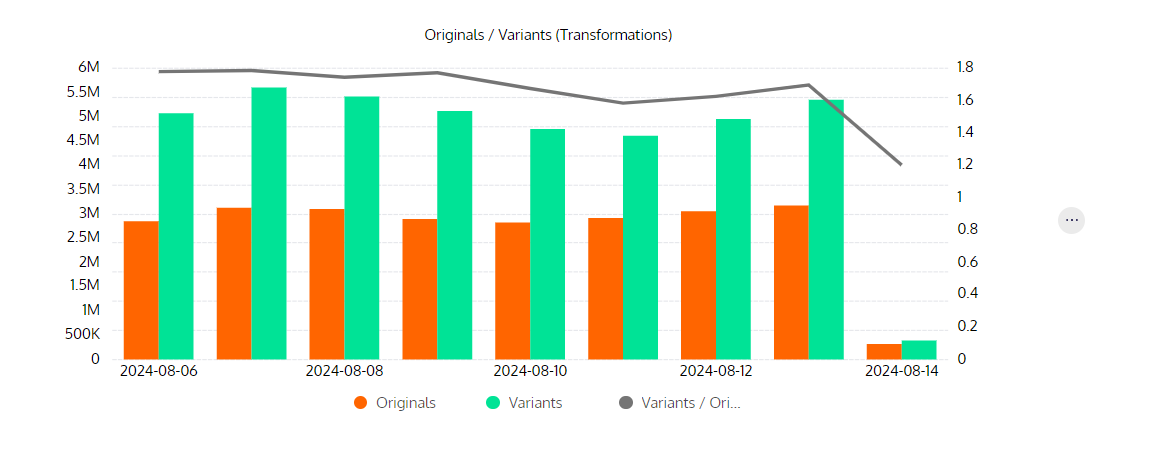
<figure><img src="/files/OaCP0ftqOYwEu5Y1m3tc" alt=""><figcaption></figcaption></figure>

<table><thead><tr><th width="58">#</th><th width="343">Title</th><th width="348">Description</th></tr></thead><tbody><tr><td>1</td><td>Originals</td><td>Total unique original Uris</td></tr><tr><td>2</td><td>Variants</td><td>Total unique resized Uris</td></tr><tr><td>3</td><td>Variant rate</td><td>Total unique original Uris / Total unique resized Uris</td></tr></tbody></table>

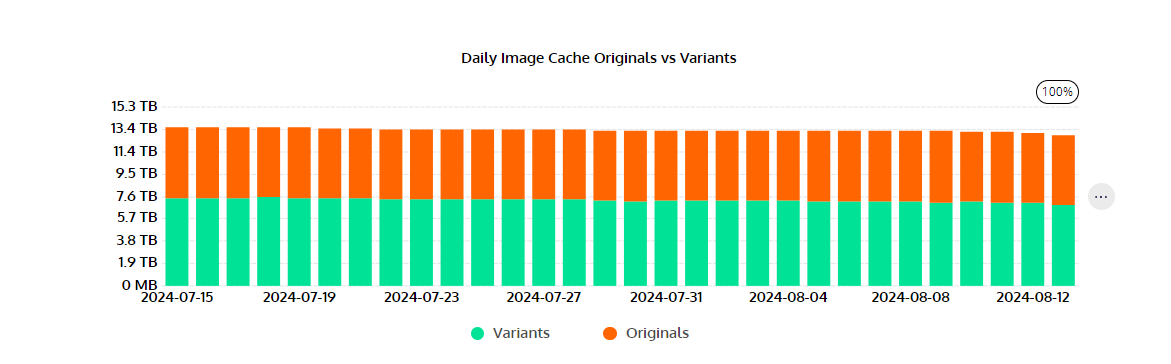
<figure><img src="/files/D9kz10LxxuWpsn3N0RIZ" alt=""><figcaption></figcaption></figure>

<table><thead><tr><th width="58">#</th><th>Title</th><th>Description</th></tr></thead><tbody><tr><td>1</td><td>Daily Image Cache Originals vs Variants</td><td>Total disk space taken by both Originals and variants, stacked per day</td></tr></tbody></table>


---

# Agent Instructions: Querying This Documentation

If you need additional information that is not directly available in this page, you can query the documentation dynamically by asking a question.

Perform an HTTP GET request on the current page URL with the `ask` query parameter:

```
GET https://docs.cloudimage.io/account-management/dashboards/volumetry.md?ask=<question>
```

The question should be specific, self-contained, and written in natural language.
The response will contain a direct answer to the question and relevant excerpts and sources from the documentation.

Use this mechanism when the answer is not explicitly present in the current page, you need clarification or additional context, or you want to retrieve related documentation sections.